AI rank tracker
The AI rank tracker that works prompt by prompt
CueScout is an AI rank tracker for the prompts your buyers type. For each prompt it records your position in the answer, how often you were mentioned and cited over the window you pick, what changed since the last sweep, and who the engine recommended instead. Branded prompts stay out of the totals until you add them back.
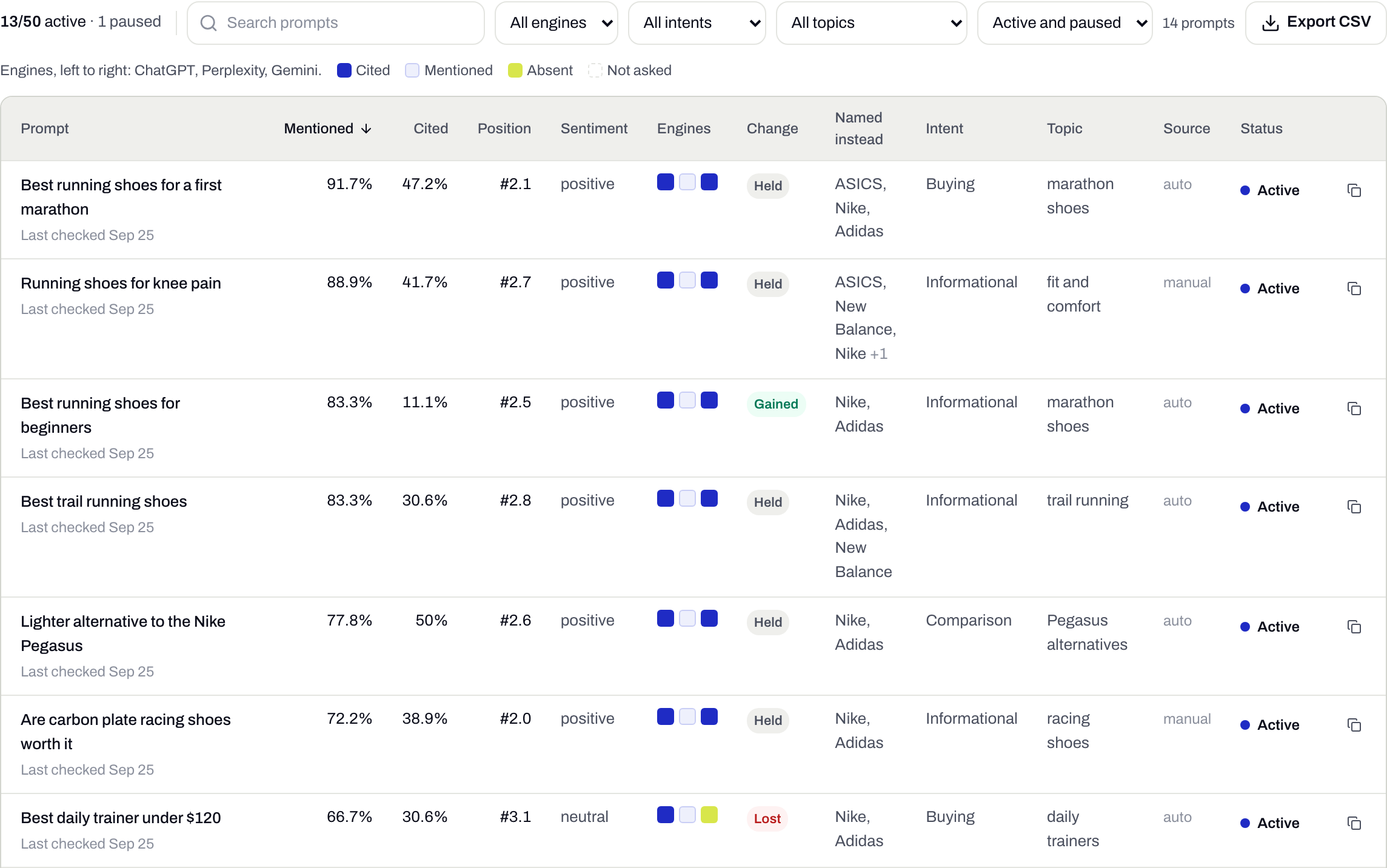
- 1Position in each answer
- 2Gained, lost or held
- 100
- prompts on Growth, 20 on Starter, each checked daily
- 4
- windows: 28 days, 12 weeks, 6 months, 12 months
- 6% vs 0.7%
- our own branded vs unbranded mention rate, August 2026
- CSV
- export of the table with your filters applied
One prompt, tracked from every angle
Rates
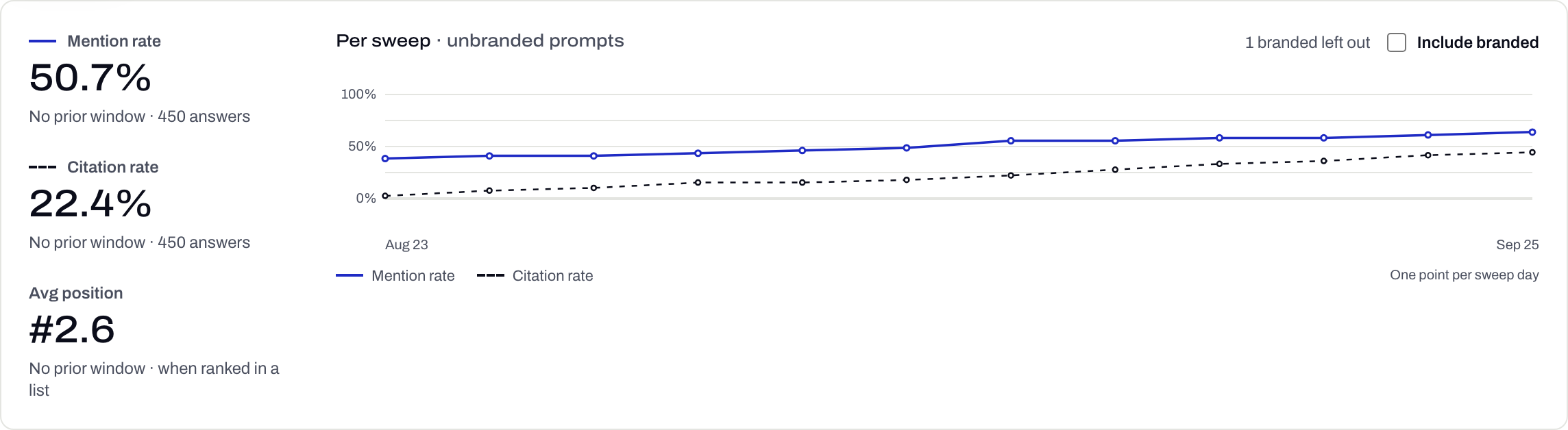
Mention and citation rate per sweep
Headline rates count unbranded prompts only. A question with your name in it gets your name back most of the time, and it would flatter every number on the page.
Intent
Every prompt gets a label
Filed by rules, no model involved. You can override any label by hand.
- Buying: "best", "top", "which"
- Comparison: "vs", "alternative"
- Informational: everything else
- Branded: your name in it
History
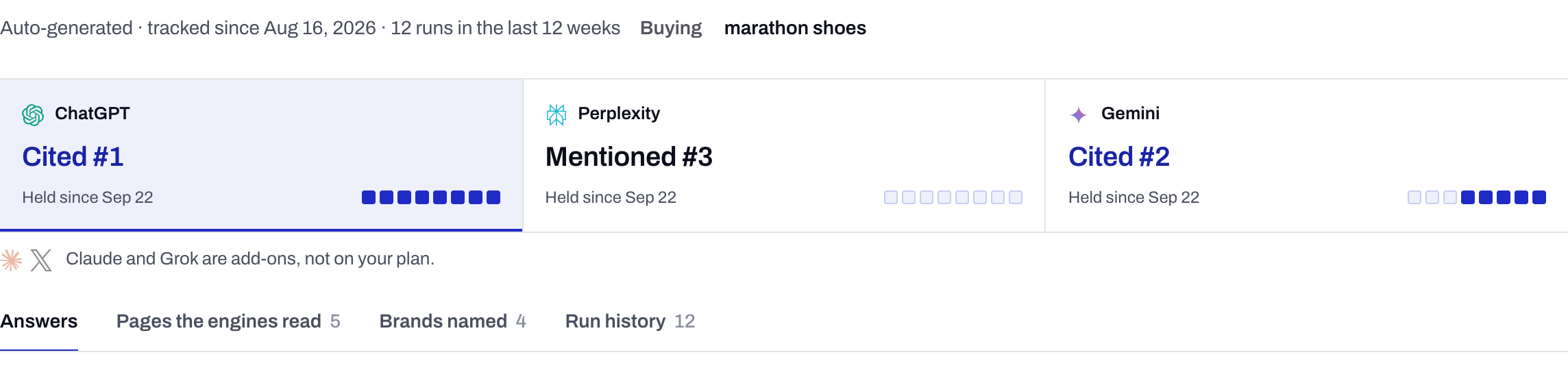
A page for every prompt
Each engine gets a card with its current verdict and how long it has held, then a cell per sweep. Stable wins and flickers look different at a glance.
Answers
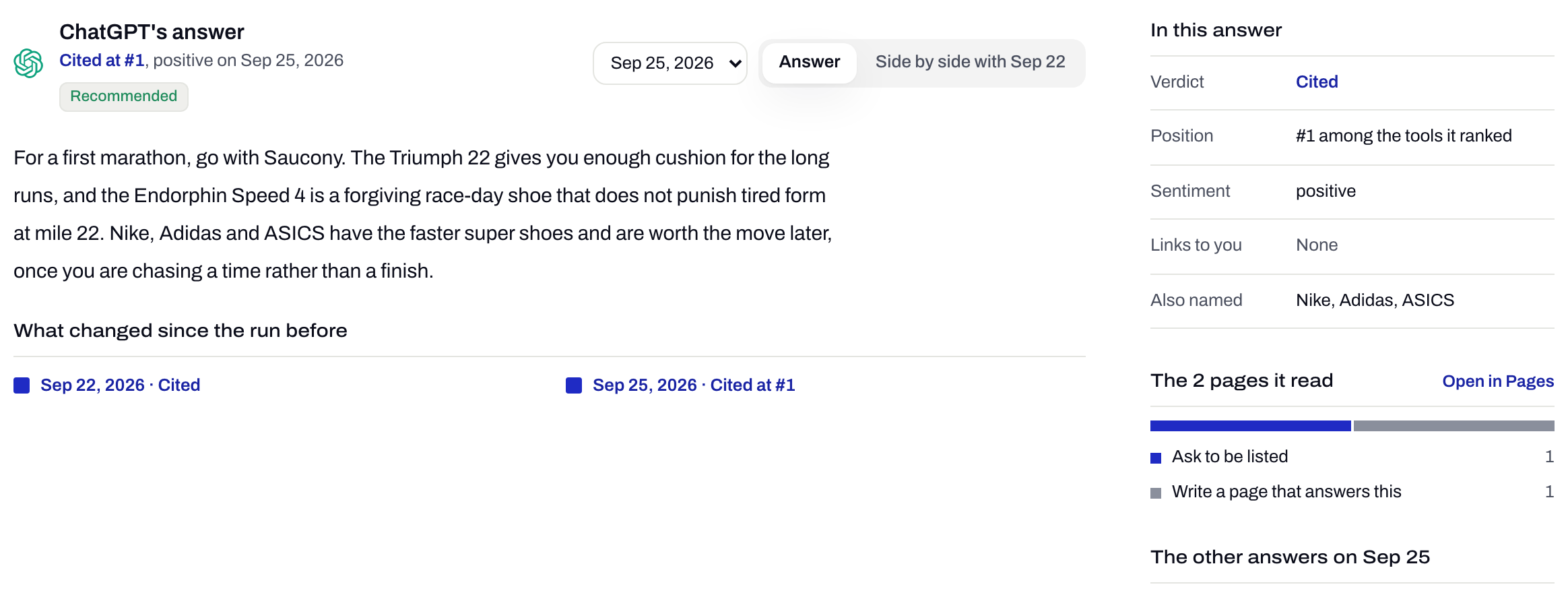
Every run, next to the one before
Open a run to read the full answer beside the previous one, the pages the engine read, and the rivals it named instead of you.
How it works
Starter tracks 20 prompts and Growth 100, shared across your brands and checked daily. More is a quote by email.
Compare plansBuild the prompt list
CueScout suggests prompts from your site and competitors. Paste your own on top; the ones you heard on a sales call are usually the best. Prompts can be tagged and paused without losing their history.
First check straight away
A new prompt is checked once the moment you add it, so its row is never blank. That first answer shows on the row but stays out of the rates, which count scheduled sweeps only.
Daily sweeps after that
Every prompt runs on each engine your plan covers, every day. If the same prompt ran twice in a day, the later answer counts.
See what moved
Each row carries a gained, lost, held or new badge per engine. The Changes view compares any two sweep dates and lists every prompt whose verdict moved, with both answers.
Where it sits
Step 1 of the loop
- CheckAsk every engine your buyers’ questions
- Find the sourceSee which pages the answer came from
- Do the workShip the To-do with its evidence
- Check againSee whether the answer moved
An AI rank tracker against a Google rank tracker
| Aspect | Google rank tracker | AI rank tracker |
|---|---|---|
| Unit | A keyword | A prompt, the way a buyer would phrase it |
| Position | Your URL among ten blue links | Your brand among the tools the answer lists |
| Result | One ranked page | Named, cited, or left out, plus who got named instead |
| Engines | ChatGPT, Perplexity, Gemini, AI Overviews, AI Mode |
What it doesn’t do
- We do not report how many people ask a prompt. No public source measures assistant query volume.
- We see the answer and the sources it returned, not the searches the engine ran behind the scenes to build it.
- Sentiment is a label (positive, neutral or negative). Two answers marked positive are not equally warm.
- Prompt text cannot be edited. Answers are stored against the wording, so a reworded prompt starts fresh and the old one is paused with its history kept.
Questions
What is an LLM rank tracker?
A tool that asks large language models like ChatGPT and Gemini a fixed set of prompts on a schedule and records where your brand appears in each answer, if it appears at all.
How is position measured in an AI answer?
When an answer lists several tools or brands, position is where yours sits in that list. Average position only counts answers that ranked a list, so an answer that named you in passing does not drag it down.
How do I choose prompts to track?
If the answer to a prompt would name a vendor, track it. If the answer would be a definition, it is a blog topic, not a visibility check. "Alternatives to <competitor>" is usually one of the most useful to add by hand.
Why does a prompt show a dash instead of 0%?
It had no answers in the window you picked: it was added recently, or it is paused. 0% means the engines answered and did not name you.
Which engines are tracked?
ChatGPT, Perplexity, Gemini, Google AI Overviews, and Google AI Mode. Starter checks ChatGPT, Perplexity, and Google AI Overviews. Growth adds Gemini and Google AI Mode. Claude is a paid add-on, and the Grok pack asks Grok 20 questions you pick each week.
Can I export the data?
Yes. The prompts table downloads as a CSV with your filters applied, one row per prompt.
Related features
All featuresSee what the AI answers say about you
Your first check is free, with no signup to start.